
Themes
A theme decides how your board looks: the cards behind your items, the colours available, and the texture of the whole thing.
Set it in edit mode by clicking Theme under Board Settings.
Available Themes
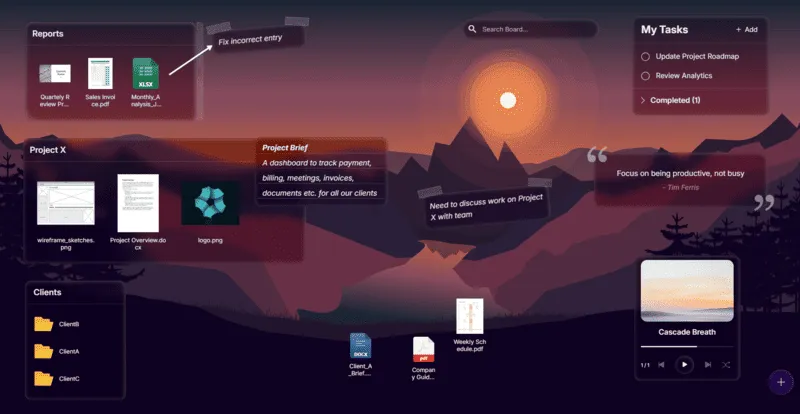
Section titled “Available Themes”The default. Frosted, translucent cards that let the wallpaper show through. Clean, and the one that leans most on a good wallpaper.
Glass has no per-card colour. The card takes its tint from whatever is behind it.
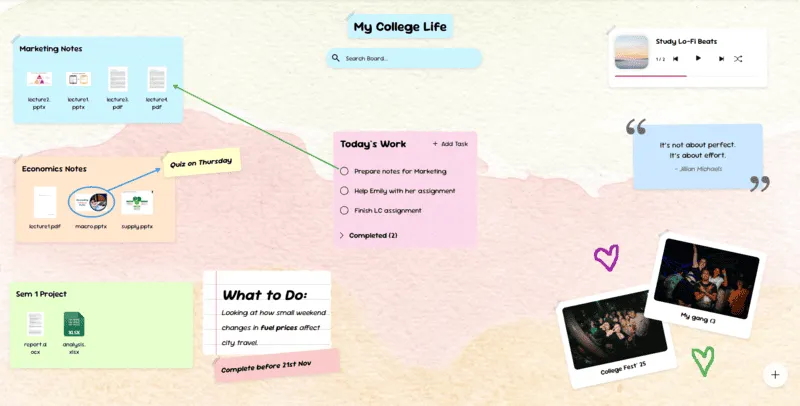
Scrapbook
Section titled “Scrapbook”Pastel paper cards with a handmade feel. Each card can have:
- A Card Colour
- A Decoration: Tape across the top, or a Torn paper edge
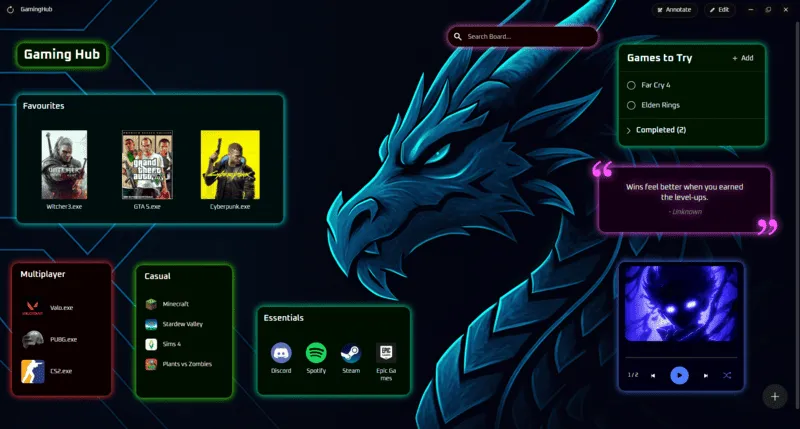
Dark, with cards that glow. Each card can have a Card Colour, which sets the colour of its glow rather than its fill.
A card is the panel behind an item. Which items draw one is partly up to you. Most widgets have a Show Card setting, and files and folders can have one too. See Widget basics.
The colour and decoration options above only appear while an item is actually drawing a card, and only on the theme that has them.
Switching themes
Section titled “Switching themes”Switching is safe. Each theme remembers its own card colours and decorations, so going Scrapbook → Neon → Scrapbook brings your board back exactly as it was.